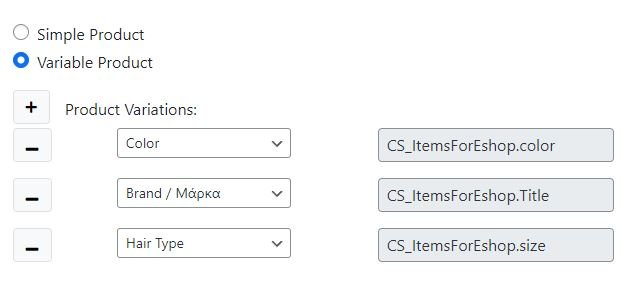
This module is designed to update every aspect a product can have. It will work with simple as well as variable products using the Attributes defined by the user using the standard WooCommerce system.
The user must map ( using the drag & drop system ) the required fields from the ERP table containing his product data.
Fields: #
productSku: a unique identifier which will allow the system to tell one product from another. Must be a unique key in the table which you use for product mapping.
productCode: Indicates a family connection between products. If some of the products are variable, this will allow the bridge to tell which is the parent and what are the childs. If all of your products are simple, map it to the same unique field as ProductSku
productTitle: it corresponds to the products display title. More specificaly it updates the post_title field in the wp_posts table.
productDescription: it corresponds to the products excert. It updates the post_excert field in the wp_posts table.
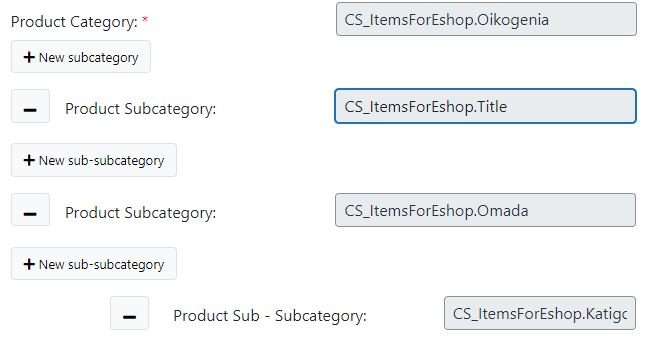
productCategory: it assigns the product to a 1st level category. If the category is not present in the eshop, the bridge will create it and after, assign it to the product.
Using the + buttons will open fields to map productSubcategories which are 2nd level as well as productSubsubcategories which are 3rd level. User can create mappings up to 3 levels deep but he can have as many of the as he wants ( ex. 3 main categories which one of them has a subcategory and a subsubcategory while another one has only one subcategory ). If a mapped term is not present in your eshop, it will be created from the initial run.
productStock: it corresponds to the products stock value. It updates the _stock field in the wp_postmeta table.
productPrice: it corresponds to the products regular price value. It updates the _regular_price field in the wp_postmeta table.
productSalePrice: it corresponds to the products sale price value. It updates the _sale_price field in the wp_postmeta table.
Length, Weight, Height: they correspond to the products dimension data. They update fields _length, _weight, _height in wp_postmeta table.
By choosing simple product you indicate that your entire product catalog as well as the ERP table, are structured as simple products. If you choose variable product you will be able to map the attributes already in the WooCommerce Attribute menu to fields in the erp containing attribute data (ex. size, color ).